

588PKR Game Deposit Complete Guide to Adding Money (2026)
Before You Make Your First Deposit
Before adding money to your 588PKR Game wallet, make sure these things are in place:
- Your account is registered and verified
- Your JazzCash, EasyPaisa, or bank account is active and has sufficient balance
- You are logged in to your 588PKR Game account
- You have a stable internet connection
Taking sixty seconds to confirm these four things saves you from running into avoidable problems mid-transaction.
Step by Step Deposit Guide
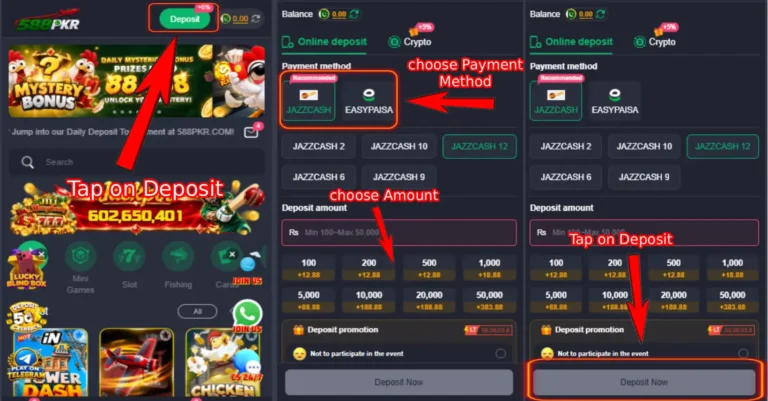
- Step 1: Open 588PKR Game on your phone and log in to your account.
- Step 2: Tap on the Wallet icon or the Deposit button. This is usually visible on the home screen or inside the main menu.
- Step 3: A list of available payment methods will appear on screen. Choose the one you want to use JazzCash, EasyPaisa, or Bank Transfer.
- Step 4: Enter the amount you want to deposit. Make sure it falls within the minimum and maximum limits shown for your chosen payment method.
- Step 5: The app will display a merchant account number or payment details. This is the account you need to send your money to. Do not close this screen until your payment is complete.
- Step 6: Open your JazzCash or EasyPaisa app in a separate window or tab. Go to Send Money and enter the merchant number shown in 588PKR Game. Enter the exact amount and complete the transfer.
- Step 7: Once the transfer is done, take a screenshot of the successful transaction confirmation. This is important keep it saved until your deposit is confirmed inside the app.
- Step 8: Go back to 588PKR Game and upload the payment screenshot or enter the transaction ID when the app asks for proof of payment.
- Step 9: Tap Confirm or Submit. Your deposit request is now sent for verification.
- Step 10: Wait a few minutes. Your 588PKR Game wallet balance will update once the payment is verified. JazzCash and EasyPaisa deposits are usually confirmed within two to five minutes.
Deposit Options and Minimum Amount
| Digital Options | Minimum Amount | Maximum Amount | Processing Time |
|---|---|---|---|
| Bank Transfer | Rs. 500 | Rs. 50,000 | 30 – 60 minutes |
| EasyPaisa | Rs. 100 | Rs. 25,000 | Instant to 5 minutes |
| JazzCash | Rs. 100 | Rs. 25,000 | Instant to 5 minutes |
How to Deposit Using JazzCash
JazzCash is the most commonly used deposit method on 588PKR Game. Here is how to complete it:
- Open the JazzCash app on your phone
- Tap Send Money
- Enter the merchant number shown in the 588PKR deposit screen
- Enter the exact deposit amount
- Enter your JazzCash PIN to confirm
- Wait for the confirmation message and take a screenshot
- Go back to 588PKR Game and submit the screenshot or transaction ID
How to Deposit Using EasyPaisa
EasyPaisa works in almost the same way as JazzCash:
- Open the EasyPaisa app on your phone
- Tap Send Money
- Enter the account number provided on the 588PKR deposit screen
- Enter the amount you want to deposit
- Confirm the transaction using your EasyPaisa PIN
- Screenshot the confirmation screen
- Return to 588PKR Game and upload the screenshot or transaction ID to complete your deposit
How to Deposit Using Bank Transfer
For bank transfers, the process takes a little longer but works the same way:
- Go to your mobile banking app or visit your bank branch
- Transfer the desired amount to the bank account details shown in the 588PKR deposit section
- Save or screenshot the transaction reference number
- Go back to 588PKR Game and submit the transaction details
- Bank transfers typically reflect within 30 to 60 minutes
First Deposit Bonus
If this is your first deposit on 588PKR Game, check the Promotions section before you deposit. New players are eligible for a first deposit bonus that adds extra credits to your wallet on top of the amount you deposit. The bonus amount and terms are shown inside the app read them before proceeding so you know exactly what to expect.
Important Tips for a Smooth Deposit
- Always send the exact amount you entered in the app. Sending a different amount can cause delays or failed verification.
- Never send money to any account number that was not shown inside the official 588PKR Game app. Scammers sometimes share fake payment details through WhatsApp or social media.
- Keep your transaction screenshot saved until your wallet is updated. If there is a delay, you will need it when contacting support.
- Do not make multiple deposit requests at the same time. Submit one, wait for it to confirm, and then make another if needed.
- Deposits made during late night hours may take slightly longer to verify than those made during normal operating hours.
Common Deposit Problems and Fixes
Deposit Not Showing in Wallet After Payment
What is happening: You completed the payment from JazzCash or EasyPaisa but your 588PKR Game wallet balance has not updated.
Fix:
- Wait five to ten minutes and refresh your wallet by closing and reopening the app.
- If the balance still has not updated after fifteen minutes, go to in-app support or live chat and share your transaction ID and screenshot.
- Do not make another deposit until the first one is resolved.
Wrong Amount Sent
What is happening: You accidentally sent a different amount than what you entered in the deposit screen.
Fix:
- Do not panic. Take a clear screenshot of the transaction showing the amount you actually sent.
- Contact 588PKR Game support immediately through in-app chat and explain the situation with your screenshot and transaction ID.
- Do not submit the deposit request with incorrect details always match the amount exactly before confirming.
Sent Money to Wrong Account Number
What is happening: You copied the wrong account number and sent money to an unintended recipient.
Fix:
- This is a serious issue. Contact your JazzCash or EasyPaisa customer service immediately to report the wrong transfer.
- At the same time, contact 588PKR Game support and explain what happened with full transaction details.
- Always double-check the account number shown in the app before sending any payment.
Deposit Option Not Loading
What is happening: The deposit screen inside 588PKR Game is blank or the payment options are not appearing.
Fix:
- Check your internet connection and refresh the app.
- Close the app completely, reopen it, and go to the deposit section again.
- Clear the app cache from Settings → Apps → 588PKR Game → Clear Cache and try again.
- If the problem continues, the payment gateway may be temporarily down. Wait fifteen to twenty minutes and try again.
Transaction ID Not Accepted
What is happening: You are trying to enter your transaction ID after payment but the app says it is invalid or not recognized.
Fix:
- Make sure you are copying the full transaction ID without any extra spaces before or after it.
- Check that you selected the correct payment method in the app before entering the ID. If you paid via EasyPaisa, make sure EasyPaisa is selected in the deposit form.
- If the ID is still not accepted, upload the payment screenshot instead and contact support with both the screenshot and the ID.
Deposit Limit Exceeded
What is happening: The app shows an error saying your deposit amount exceeds the allowed limit.
Fix:
- Check the minimum and maximum deposit limits for your chosen payment method in the table above.
- Adjust your deposit amount to fall within the allowed range and try again.
- If you need to deposit a larger amount, consider splitting it into two separate transactions on different payment methods.
Deposit Troubleshooting at a Glance
| Problem | Fix |
|---|---|
| Deposit not showing in wallet | Wait 10 minutes, then contact support with transaction ID |
| Wrong amount sent | Contact support immediately with screenshot |
| Sent to wrong account | Contact JazzCash or EasyPaisa and then 588PKR support |
| Deposit page not loading | Check internet, clear cache, try again |
| Transaction ID not accepted | Check for spaces, verify payment method selected |
| Deposit limit exceeded | Adjust amount within allowed limits |
After Your Deposit is Confirmed
Once your wallet balance updates, you are ready to start playing. Here is what to do next:
- Head to the Promotions section and claim any active bonus that applies to your deposit
- Choose a game from the home screen and start with a small bet to get familiar with how it plays
- Keep your transaction screenshot saved for at least 48 hours in case any issue comes up later
- Set a personal spending limit for your session before you begin playing
For any deposit issue not covered above, contact 588PKR Game support through the in-app live chat. Share your registered mobile number, the payment method used, the amount, and your transaction screenshot so the team can resolve your issue as quickly as possible.